
AI-Powered · Local-First · Cloud Optional
See everything.
Miss nothing.
Free for local use. Add cloud remote access when you're ready. No per-camera fees, ever.
Free forever - no account needed
Any RTSP / ONVIF camera
AI runs on your GPU, not cloud
Features
Your cameras deserve
smarter software.
smarter software.
Built for home lab users and small businesses who want real control - AI detection on your hardware, no per-camera fees, no lock-in.
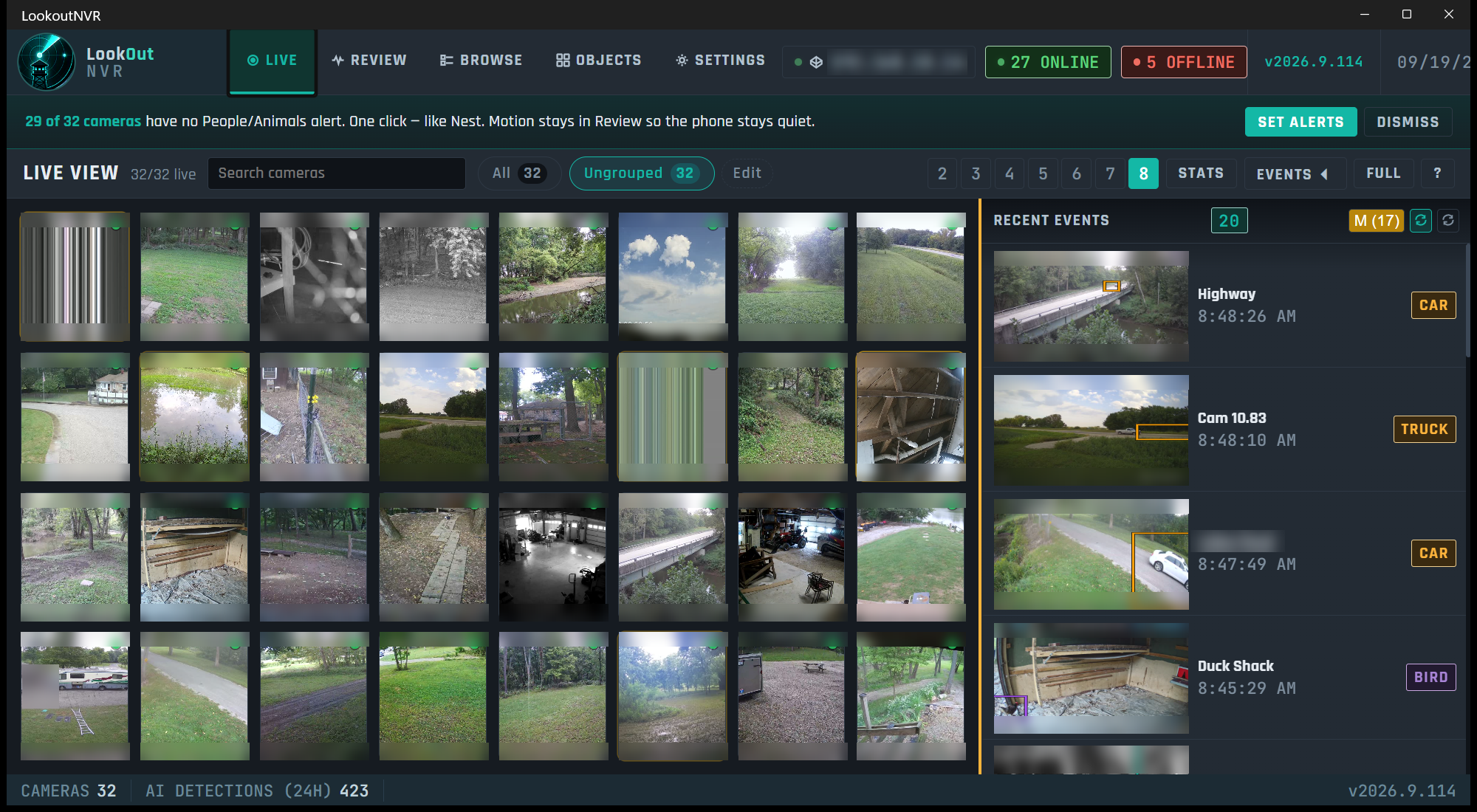
Multi-Camera Live View
All your cameras in a configurable 5, 7, 9 or 12-column grid. Designed for ultrawide monitors - dense, readable, nothing off-screen.
On-Device AI Detection
Person, vehicle, and animal. Motion is recorded first. Detection names it, on the GPU or the CPU. No per-event fee, and recording does not need the internet.
Alerts that mean something
The desktop app tells you while it is open. The phone tells you while the Lookout app is open. A lock-screen buzz after the app is closed is not live yet, and it is not a paid plan.
Desktop app for Windows
The viewer runs on Windows. The recorder runs on Windows, or on Linux in Docker. Recording does not need the cloud. A Mac window is not a download yet.
Recordings & Timeline
Continuous or motion recording onto a disk you own. New footage belongs on an NVMe or SSD. Older days can move to a larger disk. Search by camera, date, and what detection named.
The speaker answers
A raccoon in the back yard at night plays a sound on an outdoor speaker. Home Assistant, a webhook, or a script on the recorder. See the example
Optional cloud access
Footage stays on disks you own. An off-site event vault is not in this release. Open a recorder over Tailscale or the VPN you already use.
Computers and disks
It runs on a normal computer.
A Dell an office already owns is a normal recorder. New footage goes to an NVMe or SSD. Older days can sit on a spinning disk or a mounted share.
One building, one computer
A house or a small office. Windows installer, or Linux Docker when there is no NVIDIA card. The smaller image is the one without a card.
A second building is a second recorder
Cameras are recorded where they are. The Windows app can watch more than one recorder. My wall is up to 16 tiles on that PC.
Your disks, not ours
Lookout writes files. It does not speak NFS or S3. Mount a share if you want older days on a NAS. Keep today's files on the fast local disk.
Compare
How does LookoutNVR stack up?
A straightforward comparison for users evaluating NVR software. See the full comparison →
| Feature | ✦ LookoutNVR | Blue Iris | Others |
|---|---|---|---|
| Free for local use | ✓ Free tier | ✕ $99.95 one-time | ◔ Some free, some paid |
| On-device AI detection | ✓ Included, GPU or CPU | ◔ Add-on AI tool | ◔ Often an add-on or DIY |
| Modern, readable UI | ✓ Clean desktop app | ◔ Functional, classic | ◔ Varies |
| Unlimited cameras (local) | ✓ Unlimited | ◔ Varies by licence | ✓ Unlimited |
| Phone alert while the app is open | ✓ Yes | ✓ Its own app | ◔ Varies |
| Setup difficulty | ● Easy - 5 min | ● Medium | ● Medium to hard |
| Off-site event vault | ◔ On the price list, not shipped | ◔ Varies | ✕ None |
| System health dashboard | ✓ CPU / GPU / drives | ◔ Basic status | ◔ Varies |
Pricing
Local is always free.
Recording, detection, and the Windows app ship free. The limit is the computer. A business buys a site package. The off-site vault is not in this release.
Free
$0
Forever - no credit card needed
- Unlimited local cameras
- On-device AI detection
- Desktop app for Windows
- Footage on disks you own
- Alerts while the Lookout app is open
- -Off-site event vault
No credit card, no account needed
Business and commercial
Site package
a year, sized to the cameras
- One package, pooled across recorders
- A shop on one site, up to 8 cameras, stays free
- Footage stays on disks you own
- Recording does not stop if a package is over
- Priority support, plus support packages and SLAs
Prices are on the pricing page
Footage stays on disks you own. Commercial pricing and support packages are on the pricing page. Recording does not stop if a package is over.
From the Community
Built by a home lab guy,
for home lab people.
for home lab people.
★★★★★
"Finally replaced Blue Iris after 8 years. The AI detection with zero cloud dependency was the dealbreaker. Setup took 10 minutes for 22 cameras."
★★★★★
"The live view grid on my 34-inch ultrawide is exactly what I wanted - dense, readable, all cams visible at once. Nothing else comes close to this layout."
★★★★★
"The open-source NVRs are great if you love YAML. I don't. LookoutNVR gave me the same AI quality with an actual UI. Push notifications only when it matters."
Frequently Asked
Common questions.
What GPU do I need for AI detection?
None. A machine with no graphics card records and can run detection on the CPU. Windows uses DirectML when a card is present. Linux with no NVIDIA card uses the smaller Docker image. Detection speed on a card has not been measured, so size the computer from the cameras on the sizing page.
Which cameras are compatible?
Any camera that outputs RTSP or supports ONVIF - Hikvision, Reolink, Amcrest, Dahua, and hundreds more. LookoutNVR can auto-discover ONVIF cameras on your network.
How much storage do I need?
Put new footage on an NVMe or a SATA SSD. Older days can move to a spinning disk, a larger SSD, or a share the operating system has mounted. Lookout writes files. It does not speak NFS or S3. With no day limit and no size cap, the disk fills and the oldest day is deleted. The sizing page turns your cameras into terabytes.
Is the free tier really unlimited?
Yes. No camera count limit, no feature gates on local recording or AI detection. The free tier is a real product, not a trial with a timer. You never need an account or credit card to use it.
Your cameras are working.
Is your NVR keeping up?
Is your NVR keeping up?
Download LookoutNVR free. Local recording, AI detection, and a live view that doesn't make you squint - no subscription needed to get started.